Worklog approval workflow
When the administrator enables Enable approval workflow in global or per-space settings, worklogs are created in PENDING state and must be approved to count toward totals and reports.
Approval states
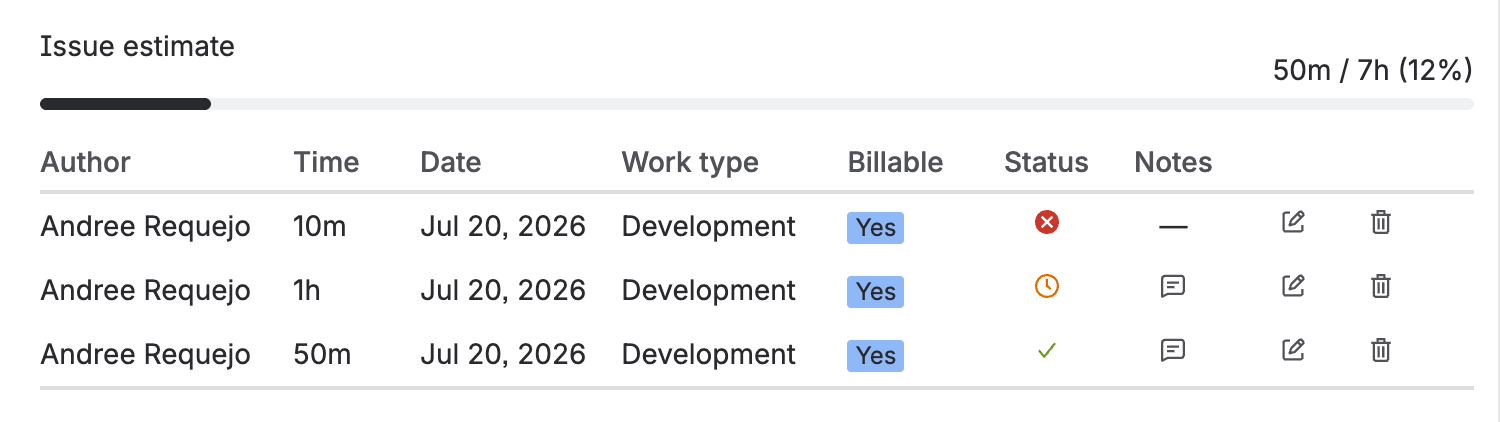
Each worklog displays an icon indicating its status:
| Status | Icon | Counts in LogSense? |
|---|---|---|
| PENDING | ⏱ (clock) | No |
| APPROVED | ✓ (check) | Yes |
| REJECTED | ✗ (cross) | No |
PENDING
- Initial state for every new worklog when the approval workflow is active and approvers are configured.
- The worklog is created in Jira (the author is the original logger).
- Does not count in side panel KPIs, gadget reports, activity, provider, or any LogSense totals.
- Displayed with a clock icon ⏱.
APPROVED
- The worklog is effective for LogSense.
- The author in Jira remains the original logger (not the approver).
- Counts toward all totals, reports, and aggregations.
- Displayed with a check icon ✓.
REJECTED
- LogSense deletes the worklog from Jira and keeps it in its history for audit.
- It is excluded from LogSense calculations.
- Displayed with a cross icon ✗.
Approver actions
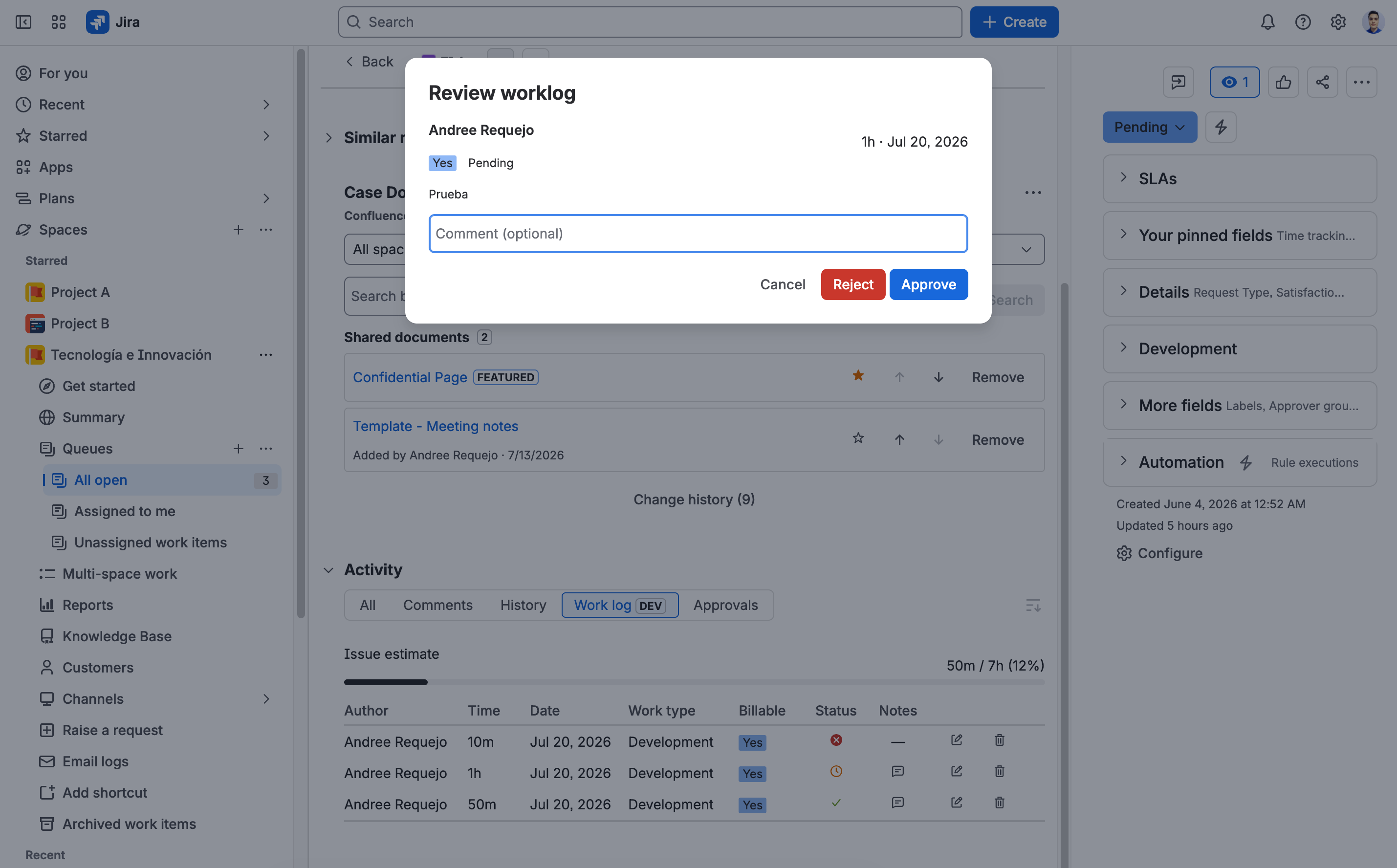
Users on the space's approver list can click the clock icon ⏱ on a PENDING worklog to open a modal with the following options:
| Action | Effect |
|---|---|
| Approve | Changes status to APPROVED. The author in Jira remains the original logger and the worklog starts counting toward totals. |
| Reject | Changes status to REJECTED. Deletes the worklog from Jira and excludes it from LogSense totals. |
Approving from the dashboard
In addition to reviewing worklogs from Activity or the issue, approvers can use the Pending approvals gadget on a dashboard. The gadget lets them monitor one or more spaces and approve or reject pending worklogs directly from the list.
Only users included in the space's approver list can use the Approve and Reject actions. After an action, the worklog no longer appears as pending and the approval indicators are updated.
See the dashboard gadgets guide to configure and use this view.
Optional comment
The modal includes an optional comment field. When approving or rejecting, LogSense automatically adds a comment to the Jira worklog:
- In Service Management spaces, the comment is added as internal (visible to the team only).
- In Software spaces, the comment is added as public (visible to the project customer).
Backward compatibility
Worklogs recorded before v2.4.0 do not have the approvalStatus field. LogSense treats them as APPROVED automatically, so they continue to count without requiring migration or administrative action.
Configuration
The approver list is configured per space in:
Space Settings → LogSense Settings → General → Approvers
See Approver configuration in the administrator guide.