Billable, non-billable, and work types
Every LogSense time entry can be classified as billable or non-billable and associated with a work type. This metadata is key for reporting and client billing.
Billable / non-billable classification
What does it mean?
| Value | Typical use |
|---|---|
| Billable | Client-billable work (development, consulting, contracted support). |
| Non-billable | Internal time (internal meetings, training, non-billable administration). |
Default value
The space administrator sets in Space settings → LogSense Settings → General whether new entries default to billable or non-billable. Users can change the value per entry.
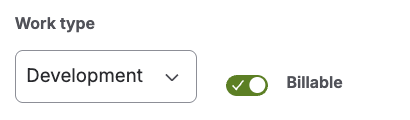
Impact on reporting
The billable hours dashboard gadget aggregates (or highlights) worklogs marked as billable, reading metadata from Forge KVS. Incorrect classification directly affects billing reports.
Agree with your team which activities are billable before the billing period closes. Correcting classifications later requires editing individual worklogs.
Work types
Selection in the form
The Work type dropdown lists types configured in Space settings → LogSense Settings → Work Types for the space. From this release, the dropdown combines active default types (included by LogSense, not deletable but deactivatable by the administrator) and custom types that the space administrator creates. Choose the one that best describes the activity.
Examples by context
Software development space:
- Development
- Code review
- Client meeting
- Bug fixing
Consulting space:
- Analysis
- Workshop
- Documentation
- Travel (non-billable if applicable)
If the expected type is missing
- If you believe the type should exist, ask the space administrator to create it as a custom type in Space settings → LogSense Settings → Work Types.
- If the space has no local catalog, it inherits site types (default and custom).
- If you don't see a default type you expected, ask the administrator to activate it from the same tab.
Worklog notes
The Notes field supports multiple lines and basic formatting (e.g. "PR #42 review with client" with line breaks and styles). Notes are stored on the Jira worklog; billable and work type metadata persist in KVS.
Editing existing entries
From the Work log tab (with active provider) or the issue worklog history, you can edit entries to correct billable, work type, or duration, subject to Jira permissions. Editing also validates Active Status and Active Work Item Types and the open billing period; see Logging time with LogSense for details.
Best practices for users
- Log time the same day to avoid forgetting correct classification.
- Use non-billable for internal training and billable only when the contract allows.
- Choose a work type consistently to simplify gadget reports.
- Use multi-line, formatted notes so the context is clear when reviewing the worklog.
For administrators
- General settings — default billable value
- Work types — space catalog (default and custom)
- Reporting gadget — billable metadata consumption