Creating the Encrypted Field
To start using Jira Secure Fortress, the first step is to create a custom field of one of the available encrypted types.
Available field types
The add-on offers three encrypted field types:
- Encrypted Custom Field: Single-line text field. The standard type for short values such as passwords, tokens, or identifiers.
- Encrypted Text Area: Multi-line text field. Ideal for longer content, such as confidential notes or sensitive descriptions.
- Encrypted Number: Encrypted numeric field. Designed to store sensitive figures, such as codes or financial values.
Preview images in the selector
The Encrypted Text Area and Encrypted Number types display a visual reference image next to their name in the Jira selector, making them easier to identify when creating a new field.
Steps to create the field
- Go to the Jira Administration menu > Issues.
- In the "Fields" section, click on Custom Fields.
- Click the Add custom field button.
- In the modal window that appears, search for and select the encrypted field type you need.
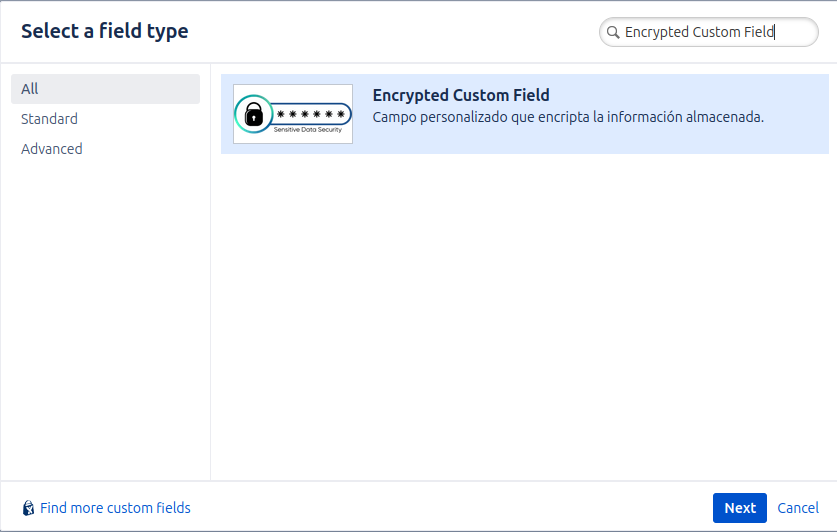
- Click Next.
- Configure the field's name and description. For example, "Access Credentials".
- Associate the field with the Jira screens where you need it to appear (e.g., the issue creation and editing screen).
Once created, the field will be available to be added to Jira projects, but its value will remain encrypted by default. The next step is to configure who can access its content from the Secure Fortress Dashboard.