Work Profiles
Work Profiles in Jira Capacity Planner have evolved to offer much greater flexibility. Instead of a single global profile, you can now create multiple work profiles that define different work schedules. Each profile can be reused and assigned to one or more teams.
This functionality is ideal for organizations with different work arrangements, such as:
- Standard 8-hour, 5-day workweeks.
- Compressed workweeks (e.g., 4 days of 10 hours).
To manage profiles, navigate to Administration > Manage apps > Capacity Planner > Work Schedule.
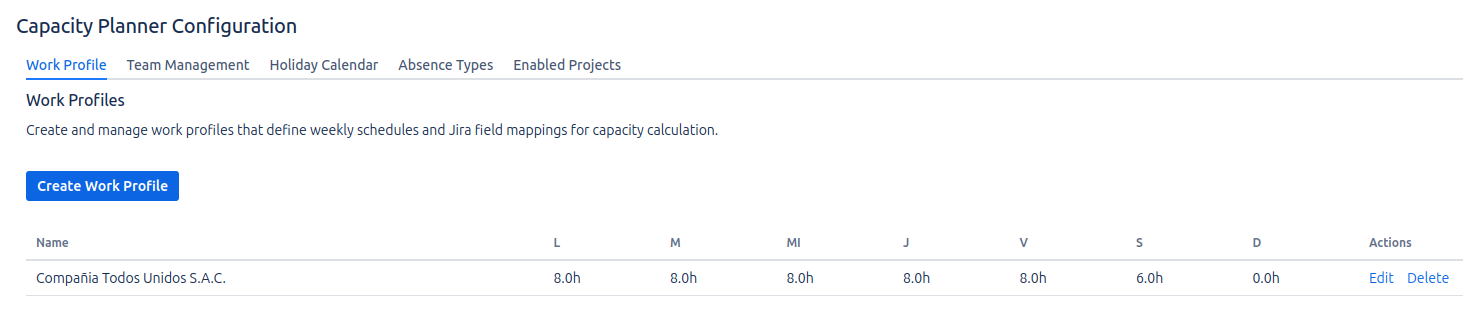
Creating a Work Profile
Click on Create Work Profile to define a new work schedule.
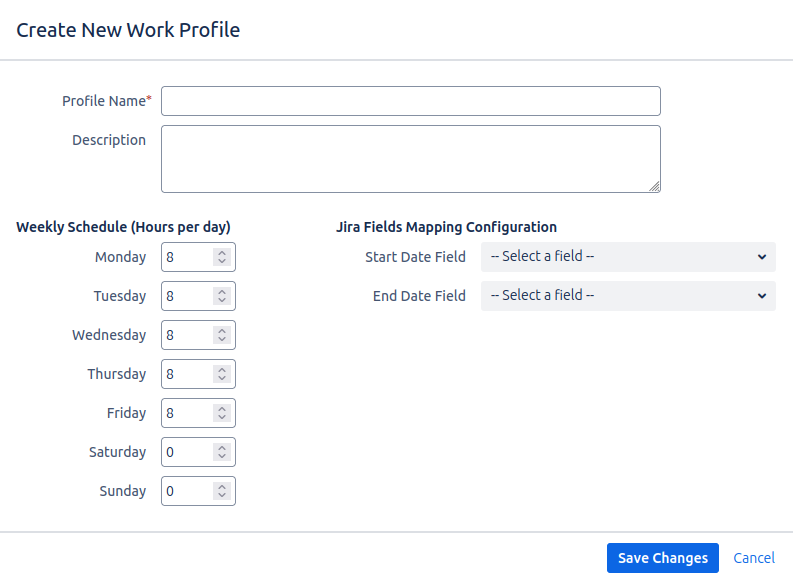
1. Work Schedule Configuration
- Profile Name: Provide an intuitive name, such as
8h Day (Mon-Fri)orCompressed Week. - Description: Optional field to add context.
- Hours per Day: Specify the number of working hours for each day. Days with
0hours are considered non-working days.
2. Issue Date Field Mapping
This configuration is crucial and is defined within each profile.
- Start Date Field: Select the issue field that marks the start of a task (e.g.,
Start Date). - End Date Field: Select the field that marks the completion (e.g.,
Due Date).
The correct configuration of these fields is vital. If they are not mapped, the planner will not be able to calculate assigned hours, showing the workload as 0.
Assigning a Profile to a Team
A work profile has no effect until it is assigned to a team. Each team member's capacity will be calculated based on the work profile their team is assigned to.
The assignment is done in the Team Management section, where you must select one of the created profiles in the Work Profile field when creating or editing a team.