Enabled Projects
This section allows you to control in which Jira projects the Jira Capacity Planner tool will be available. For the planner tab to appear in a project's side menu, it must be explicitly added to the list of "enabled projects".
Management is done from Administration > Manage apps > Capacity Planner > Enabled Projects.
Main View
The main page displays a table containing only the projects that have already been enabled. From here, you can quickly see which projects have access to the planner and you can also remove any of them from the list.
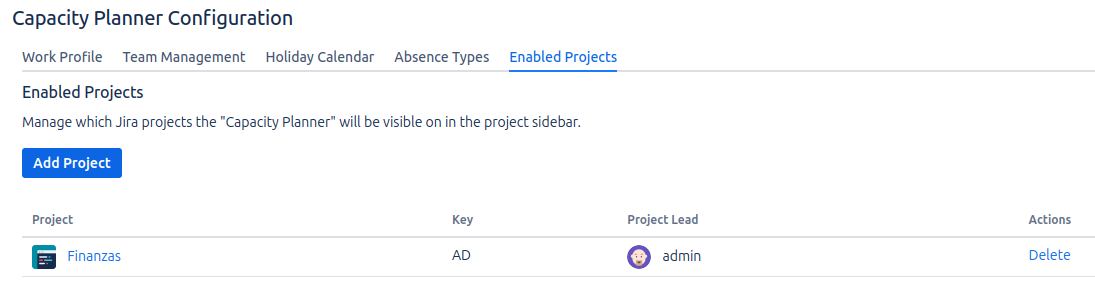
Enabling a New Project
The process to enable a project is as follows:
- Click the "Add project" button.
- A modal will open with a search field.
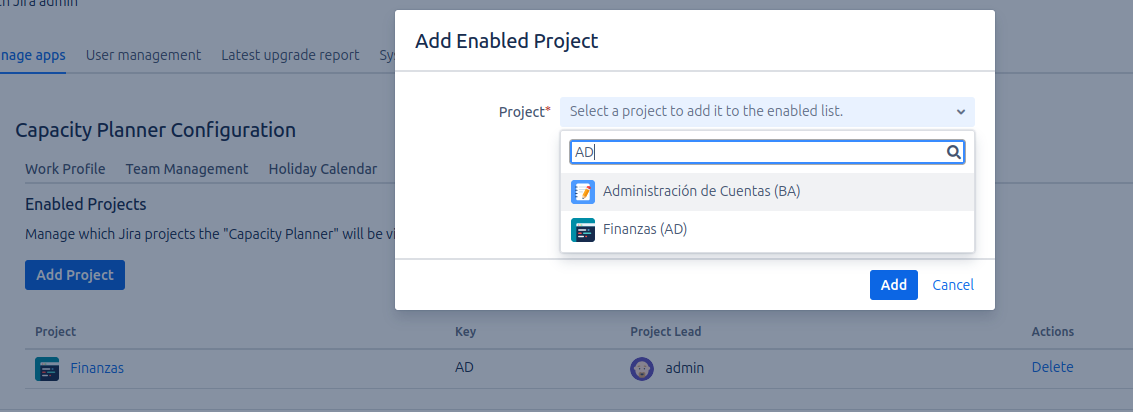
- Search and select: Type the name of the project you want to enable. The field will show you matches so you can select it.
- Click Add.
Even if a project is enabled, the "Capacity Planner" option will only be visible to users who have the "Browse Projects" permission in that project. This ensures that only relevant project members can access the planning tool.