Flexible Merge Action Control
Jira PDF Merger DC version 1.1.0 introduces greater flexibility in how merged PDFs are handled, allowing administrators to define a default action and enabling users to override it based on their needs. This section details the administrator-level configuration.
Setting the Default Merge Action
Administrators can now set a default action for PDF merge operations globally. This ensures standardization in most cases, while flexibility for end-users is addressed in the user guide.
Available Default Actions:
- Replace Originals: The PDFs selected for merging are replaced by the new merged PDF. The original PDFs are deleted.
- Attach as New: The merged PDF is added as a new attachment to the issue, preserving the original PDFs.
- Download Only: The merged PDF is generated and offered for download, without automatically attaching it to the issue or modifying existing attachments.
How to Configure It
- Navigate to Jira Administration > Manage apps.
- Search for "PDF Merger" and click on "General Configuration."
- Within the configuration screen under the General tab, you will find a section to set the "Default Action."
- Select one of the available options ("Replace originals," "Attach as new," "Download only") from the dropdown menu.
- Save the changes.
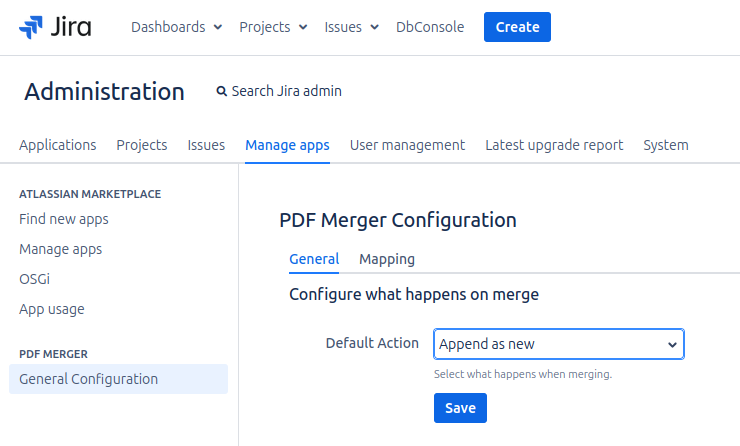
This configuration will be the pre-selected action for all users when merging PDFs. However, as detailed in the User Guide, users will be able to modify this choice at the time of the merge if necessary.