Frequently Asked Questions (FAQ)
Here are answers to some of the most common questions about the Jira PDF Merger DC plugin.
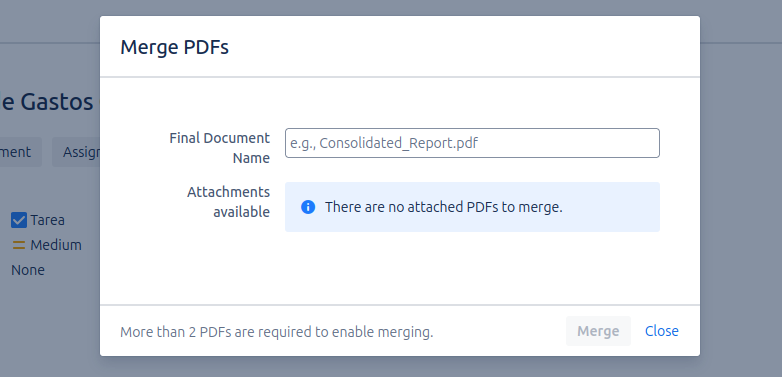
P: What happens if an issue has no PDF attachments?
R: If you navigate to the Merge PDFs option on an issue that has no .pdf attachments, the merge modal will simply display a message indicating that no files were found to merge. The merge option will be disabled.
P: Is there a limit to the number of files that can be merged? R: There is no strict limit imposed by the plugin on the number of files you can select. However, the real limit is the maximum attachment size configured in your Jira instance. If the final merged PDF file exceeds that size limit (e.g., 20MB), the process will fail, and the file will not be attached to the issue.
P: Can the original files be recovered after merging? R: Not directly through the plugin. One of the key features of the tool is to clean up the attachments section, so the selected original files are deleted from the issue after a successful merge. The only way to recover them would be through a Jira database restore or if a system administrator has a backup of the attachments.
P: Why don't I see the "Merge PDFs" button on my issue? R: If you can't find the Merge PDFs option in the "More" menu of an issue, it could be for several reasons:
- Permissions: Although this plugin does not require complex configuration, its visibility could be affected by general project permissions. Ensure you have the proper permissions to view and manage attachments in the project.
P: What permissions do I need to merge PDFs? R: To successfully merge PDFs, the user must have the following permissions in the Jira project:
- Create Attachments: Necessary to add the merged PDF file to the issue.
- Delete Attachments: Necessary for the plugin to remove the original PDF files that were used in the merge.
If you do not have both permissions, the merge operation will not complete, and you will receive an error message indicating the lack of permissions. Contact your Jira Administrator to grant you the necessary permissions.