Plugin Configuration
The Jira Live Chat (DC) administration panel is located at Jira Administration > Manage apps > Jira Live Chat (DC). From here you can configure the plugin's global parameters.
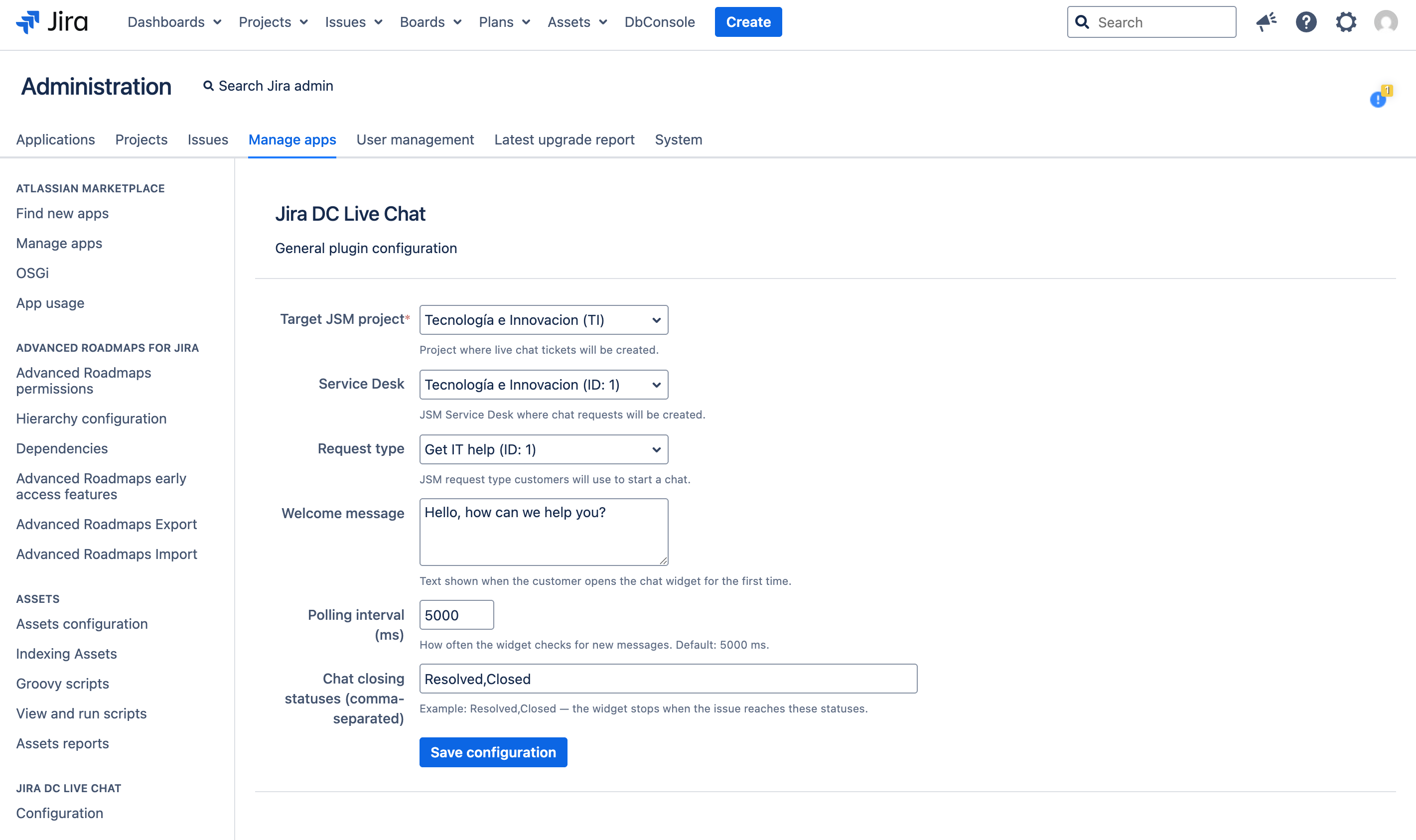
Target JSM project
Select the Jira Service Management project where live chat tickets will be created.
- Project: Tecnología e Innovación (TI)
- Chat issues will be automatically created in this project.
Service Desk
Choose the JSM Service Desk associated with the project, where chat requests will be managed.
- Service Desk: Tecnología e Innovación (ID: 1)
- Select the Service Desk corresponding to the target project.
Request type
Define the JSM request type customers will use to start a chat from the portal.
- Request Type: Get IT help (ID: 1)
- Customers will use this request type when starting a conversation.
Welcome message
Customize the initial message that customers see when they open the chat widget for the first time.
- Default value: "Hello, how can we help you?"
- Supports plain text (no HTML formatting).
Polling interval (ms)
Configure how often the widget checks for new messages.
- Default value: 5000 ms (5 seconds).
- A lower value reduces latency but increases server load.
Chat closing statuses
Define the issue statuses at which the chat is considered closed, separated by commas. When an issue reaches one of these statuses, the chat session automatically ends for the customer.
- Default value:
Resolved,Closed - Statuses must match the exact names configured in your Jira workflow.