Introduction to Jira Live Chat (DC)
Jira Live Chat (DC) is a Jira Service Management Data Center add-on that enables real-time communication between service portal customers and support agents. Each conversation is automatically linked to a JSM issue, providing full traceability without leaving the Jira ecosystem.

Main Features
-
Portal chat widget: Customers can start a chat directly from the JSM service portal, providing a summary and description to contextualize their request.
-
Agent tray: Agents manage active sessions from the project sidebar, with a three-column layout: active sessions, conversation, and request details.
-
Automatic issue creation: Each new chat automatically generates a JSM issue, with messages stored as issue comments.
-
Attachment support: Both customers and agents can attach files to the conversation. Files are stored as native issue attachments in Jira, with inline preview for images and download links for other types.
-
Session persistence: The chat session is maintained using
sessionStorage, allowing customers to recover their conversation even after page reloads. -
Administrative configuration: Administrators can configure the polling interval, welcome message, and closing statuses from the Manage Apps panel.
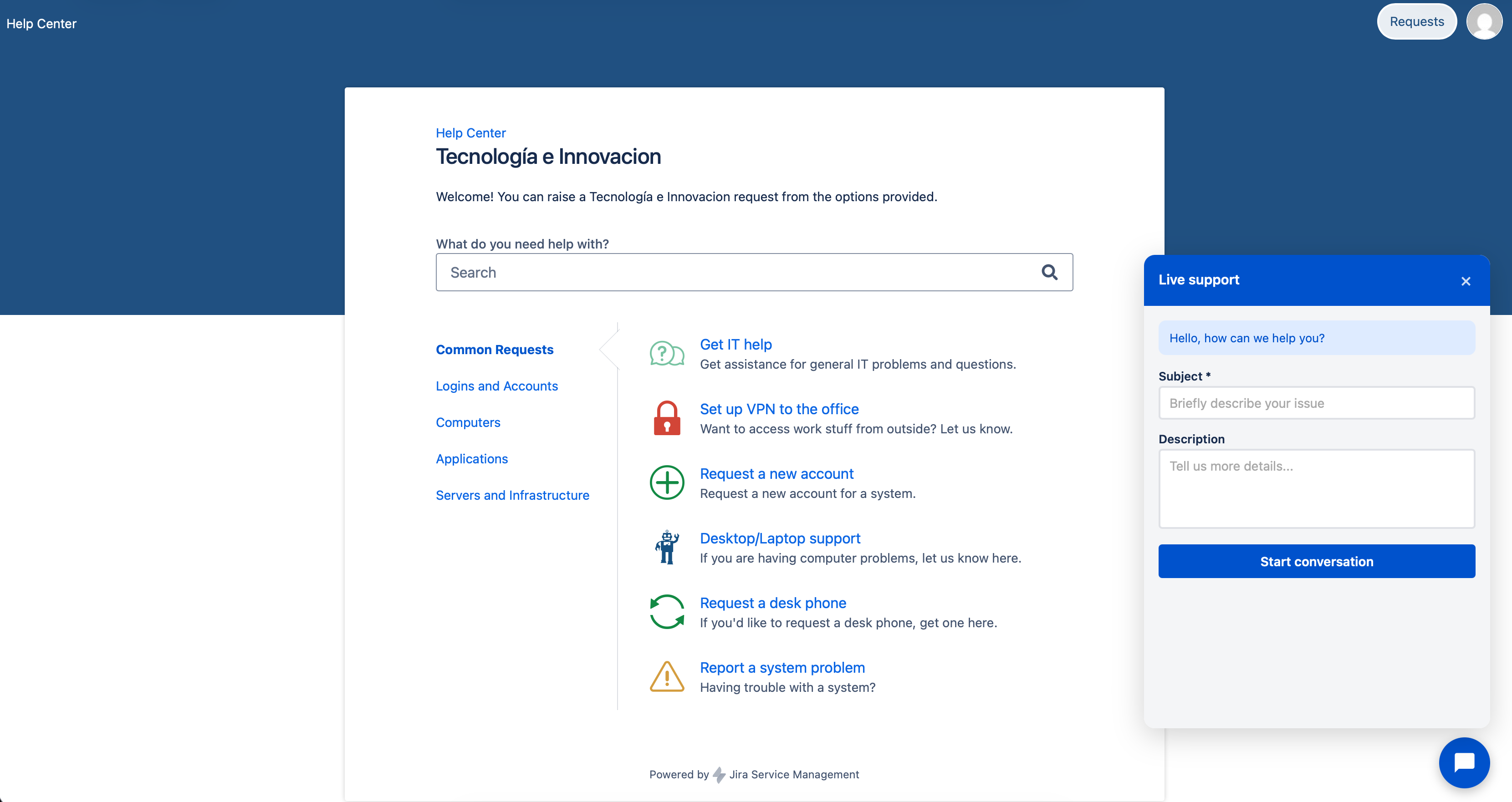
This add-on is ideal for support teams that need to offer real-time assistance from the JSM portal, keeping the entire conversation history linked to the issue for later review and auditing.