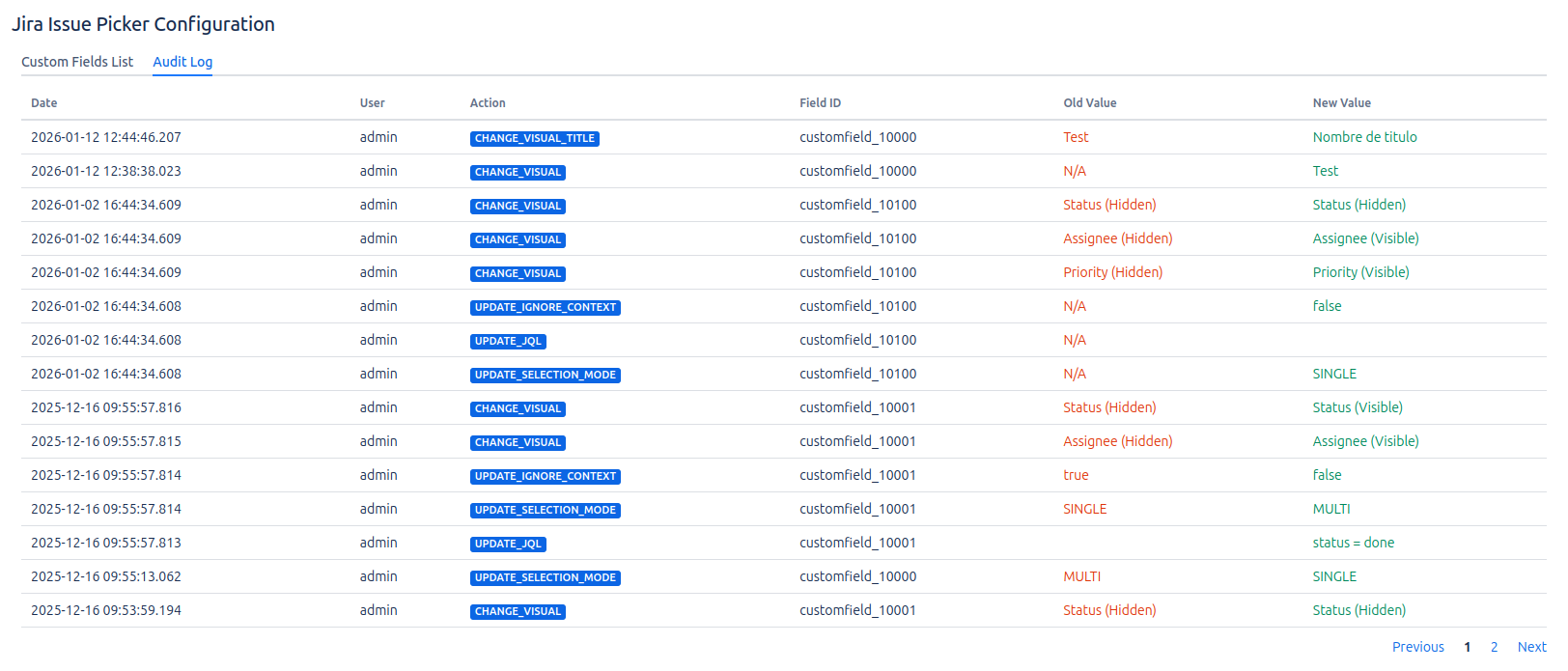
Audit Log
To improve security, control, and traceability of changes, Jira Issue Picker includes its own audit log screen. Every time a change is made to a field's configuration, an event is recorded in this section.
What changes are logged?
All modifications related to the configuration of "Jira Issue Picker" fields are audited. This includes:
- Any change saved in the "General" or "View" tabs of the field configuration.
- Changes to the JQL filter.
- Switching between single and multiple selection.
- Modification of visible fields in the issue view.
How to access the audit log?
The audit log is located in a new tab within the add-on's main dashboard.
- Navigate to the Main Dashboard of the "Jira Issue Picker" add-on.
- You will see two tabs at the top: Field List (the default view) and Audit Log.
- Click on the "Audit Log" tab to see the history of changes.
The audit table displays the following information for each event:
- Date and Time: When the change occurred.
- Author: Which user made the change.
- Action: The type of event (e.g.,
UPDATE JQL,CHANGE_VISUAL). - Field ID: The identifier of the field whose configuration was updated.
- Details: A summary of the change made, including the previous and new value.