Issue panel as visual summary
From version 2.4.0, the LogSense side panel (jira:issuePanel) is redesigned as an issue metrics dashboard, replacing the previous worklog-table UI. Its purpose is to provide at-a-glance insight while browsing the issue, without duplicating the Work log tab.
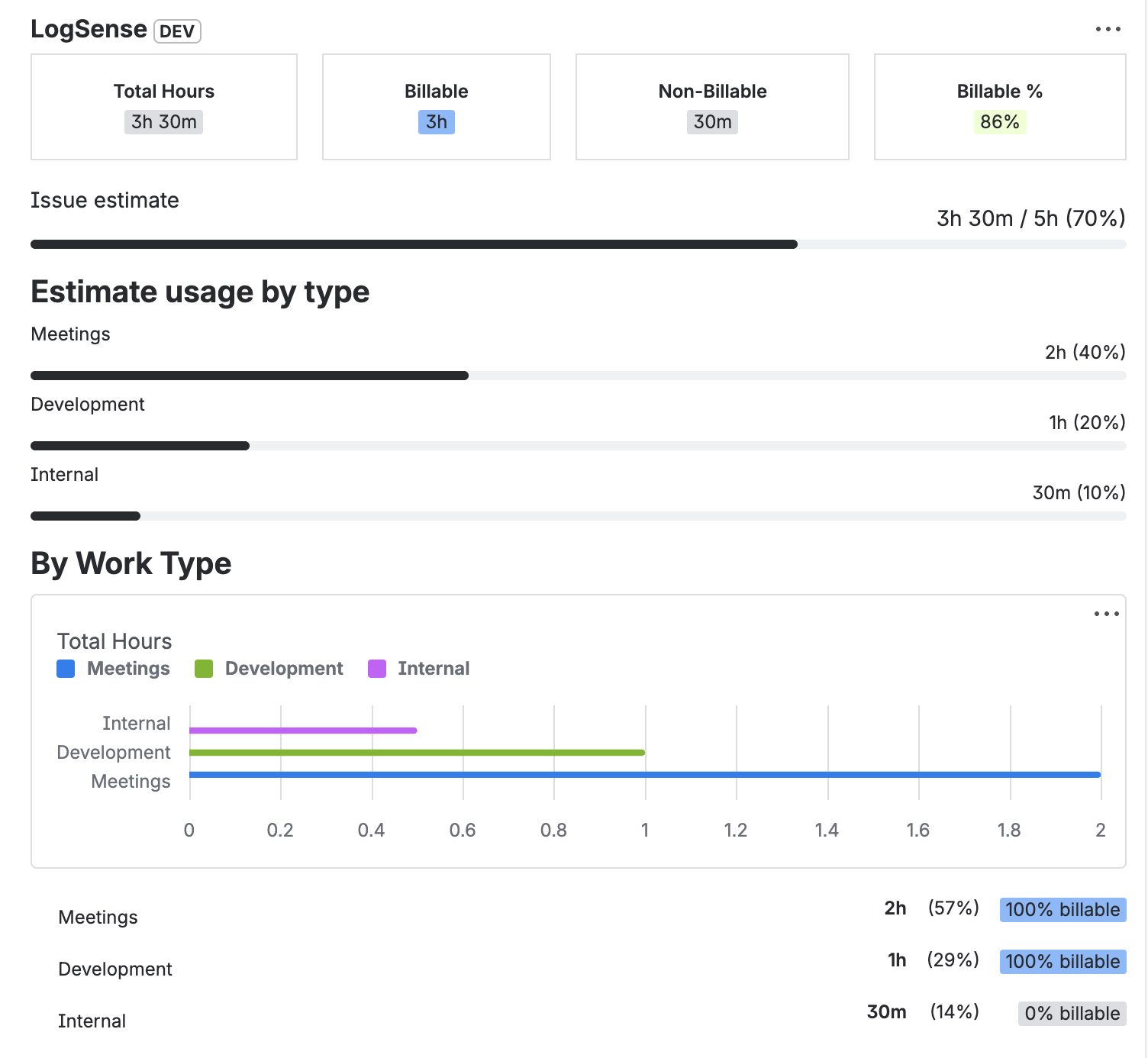
What the panel shows
Issue KPIs
| Metric | Description |
|---|---|
| Total logged | Sum of hours logged on the issue (APPROVED worklogs only). |
| Billable / Non-billable | Billable and non-billable hours. |
| % Billable | Percentage of total that is billable. |
Work type breakdown
Proportional horizontal bars showing effort distribution by each work type configured in the space.
Estimate vs spent bar
Visual indicator relating time logged to the issue's original estimate, enriched with LogSense context.
What the panel does NOT do
| Action | Available in |
|---|---|
| Create worklog | Issue Log work action |
| Edit worklog | Work log tab |
| Delete worklog | Work log tab |
| View full history | Work log tab |
Requirements
- LogSense must be active as the time tracking provider.
- The panel only shows when LogSense is the active provider (since v2.3.0).