Connections
A connection stores access to a remote Jira Cloud site. Only Jira administrators can create or edit a connection, rotate its token, or deactivate it.
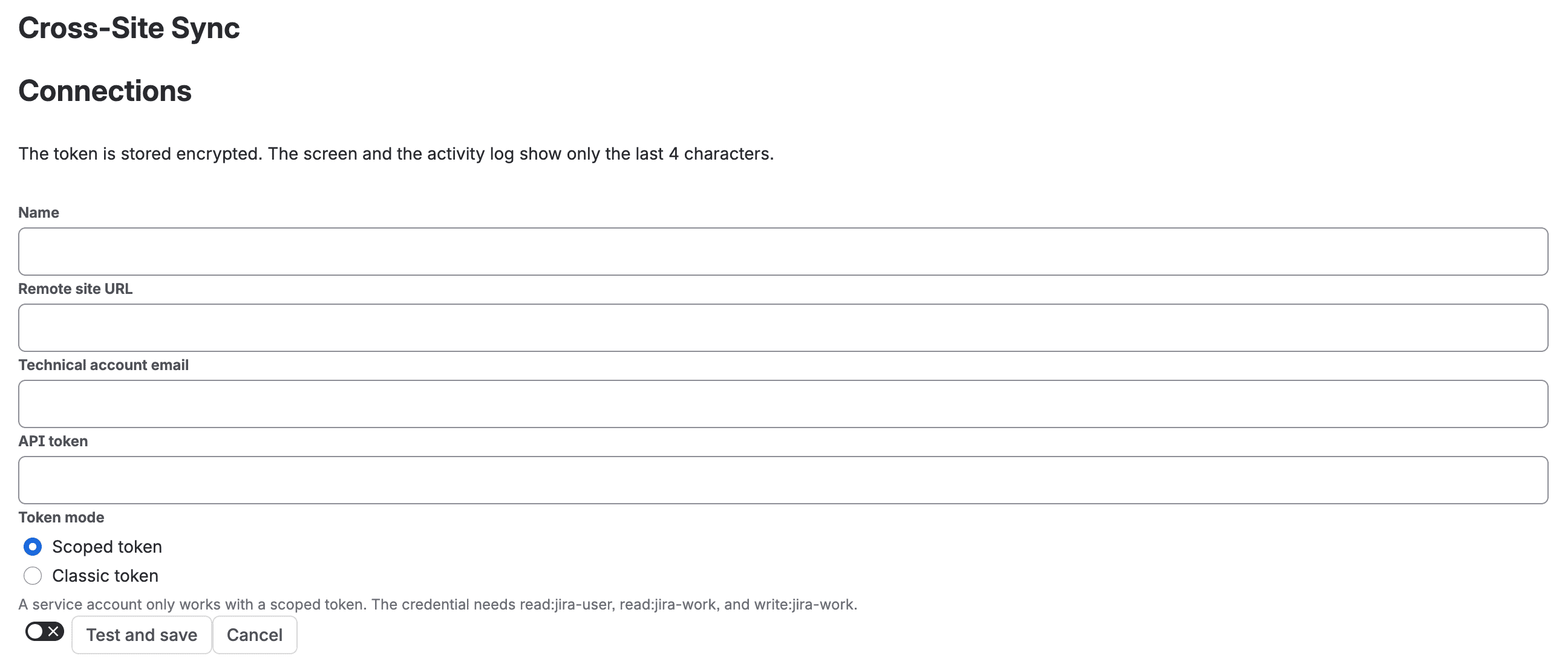
Add and test a connection
- Open Cross-Site Sync for Jira administration and select Connections.
- Choose Add connection.
- Enter a name, the remote site URL, the technical account email, and its API token.
- Select Classic token or Scoped token, and indicate whether the token has an expiry date.
- Select Test and save. The app checks that the site is reachable and that the credentials have access; one button tests and saves the connection.
The technical account must be able to create work items in the remote destination space. Permissions for comments and attachments depend on the features enabled in each rule. If the test fails, check the URL, token, and account permissions before trying again.
Protect and rotate the token
- The token is stored encrypted. The interface and activity log show only its last four characters; you cannot retrieve the full token from the screen.
- To rotate it, enter the new token and select Test and replace. The app tests the new credential before replacing the old one.
- If the token expires, set its expiry date to receive notices 30, 7, and 1 day beforehand. You can change these thresholds in global settings.
- If the token expires or the remote site rejects it, the connection needs attention. Pending jobs are paused and kept; fix the connection and resume it to continue.
Connection states
| State | Meaning | What to do |
|---|---|---|
| Available | The connection was validated. | You can use it in a rule. |
| Credential rejected | The remote site did not accept the token. | Check or rotate the token, then test again. |
| No permission | The technical account does not have enough access. | Ask the remote site's administrator to review the account permissions. |
| Site unreachable | The app could not reach the remote site. | Check the URL and site availability, then test again. |
| Deactivated | An administrator deactivated the connection. | Reactivate it or create another connection, if needed. |
The app checks connection health daily. Deactivating a connection pauses its rules and pending jobs; it does not remove existing links.