Using the Field
Interacting with the Issue Picker field is designed to be a quick and intuitive process, allowing you to link Jira issues without interrupting your workflow.
Searching and Selecting Issues
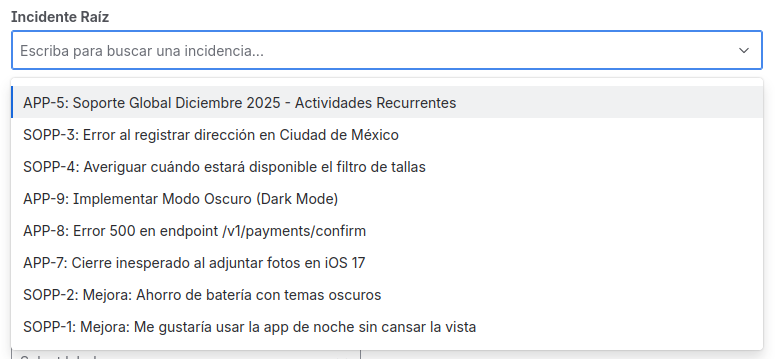
When you encounter an Issue Picker field on an issue, simply click on it to activate it.
- To search for an issue: Start typing the issue key (e.g.,
PROJ-123) or any part of its summary. The field will show you a list of matching results in real-time. - To select an issue: Click on the desired issue from the results list.
If the field is configured for multiple selection, you can repeat the process to add as many issues as you need. To remove an already selected issue, simply click the "x" next to its name.
Viewing Information
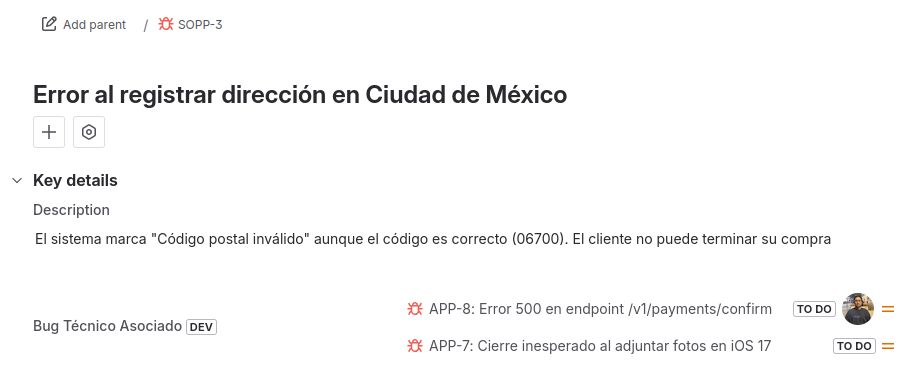
Once you have selected one or more issues, the field will display them in a clear and enriched way. Depending on how the administrator has configured the View Tab, you will be able to see not only the key and summary of the issue, but also additional information such as:
- The current assignee.
- The status it is in.
- The priority icon.
This visualization gives you valuable context directly from the issue you are working on.