Fields Dashboard
The Issue Picker fields dashboard centralizes the management of all your custom fields of this type in one place. From here, you can quickly see all existing fields, their key information, and access their configuration with a single click.
How to access the dashboard?
- From the main Jira navigation, go to Apps.
- In the dropdown menu, select Issue Picker Field.

Understanding the Dashboard
The dashboard presents a list of all Issue Picker Field type fields you have created in your Jira instance.
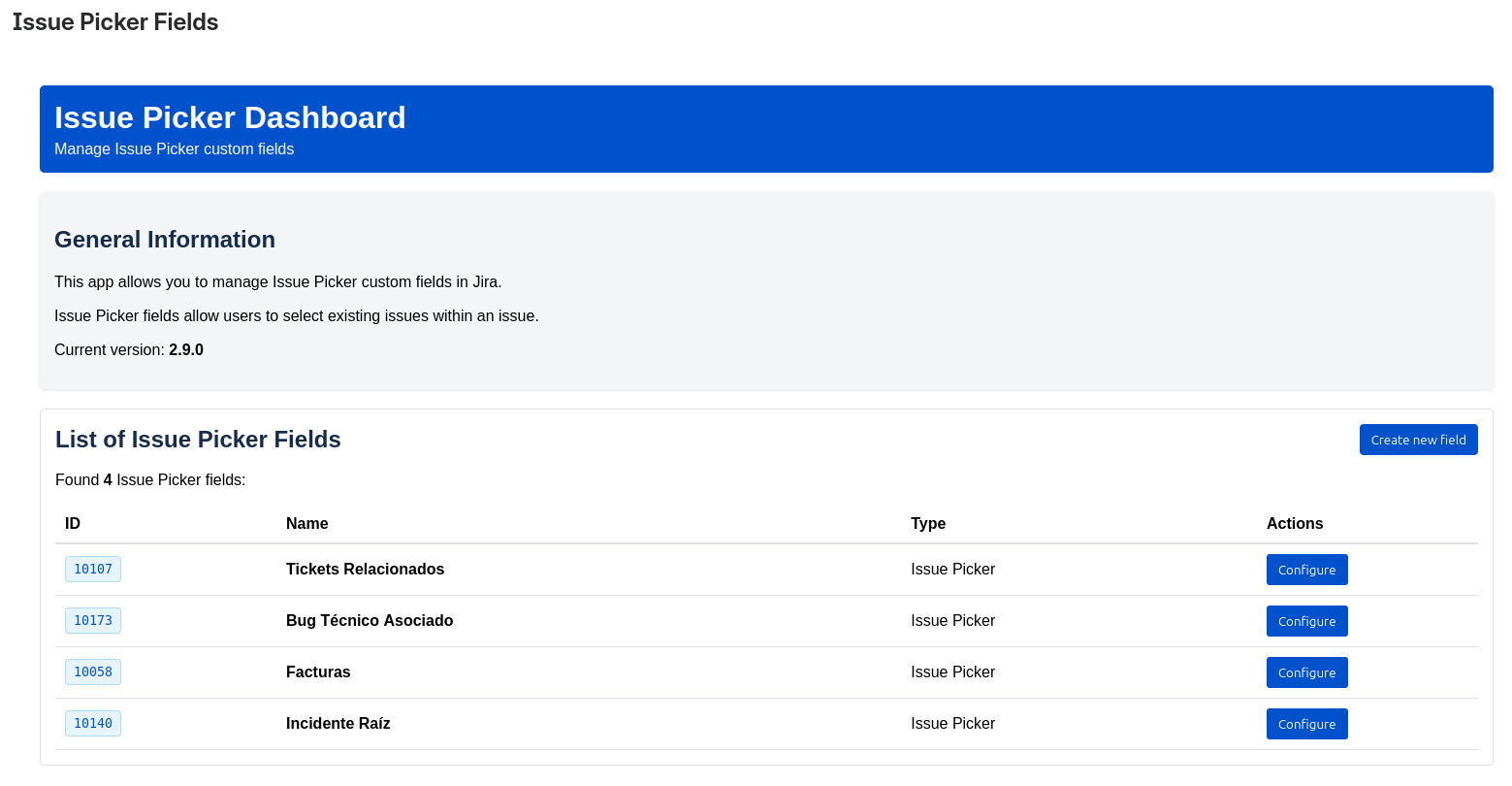
The table contains the following columns:
- ID: The unique identifier of the custom field.
- Name: The name you gave the field when you created it.
- Type: The field type, which will always be Issue Picker Field.
- Actions: Contains the operations you can perform on the field.
- Configure: A shortcut that takes you to the field configuration page, the same one you would find in the custom fields section of Jira.
Why use the dashboard?
- Centralized visibility: You don't need to search through all your custom fields in the Jira settings. All your Issue Picker fields are in a single view.
- Quick access: Save time when configuring your fields, as you can jump directly to the configuration from this table.
- Simplified management: It makes administration easier as your use of Issue Picker grows.