LogSense Settings — Holidays
The Holidays tab defines the space's holiday calendar. When holiday blocking is active on the General tab, users cannot log time on those dates.
Access
- Space → LogSense Settings → Holidays tab.
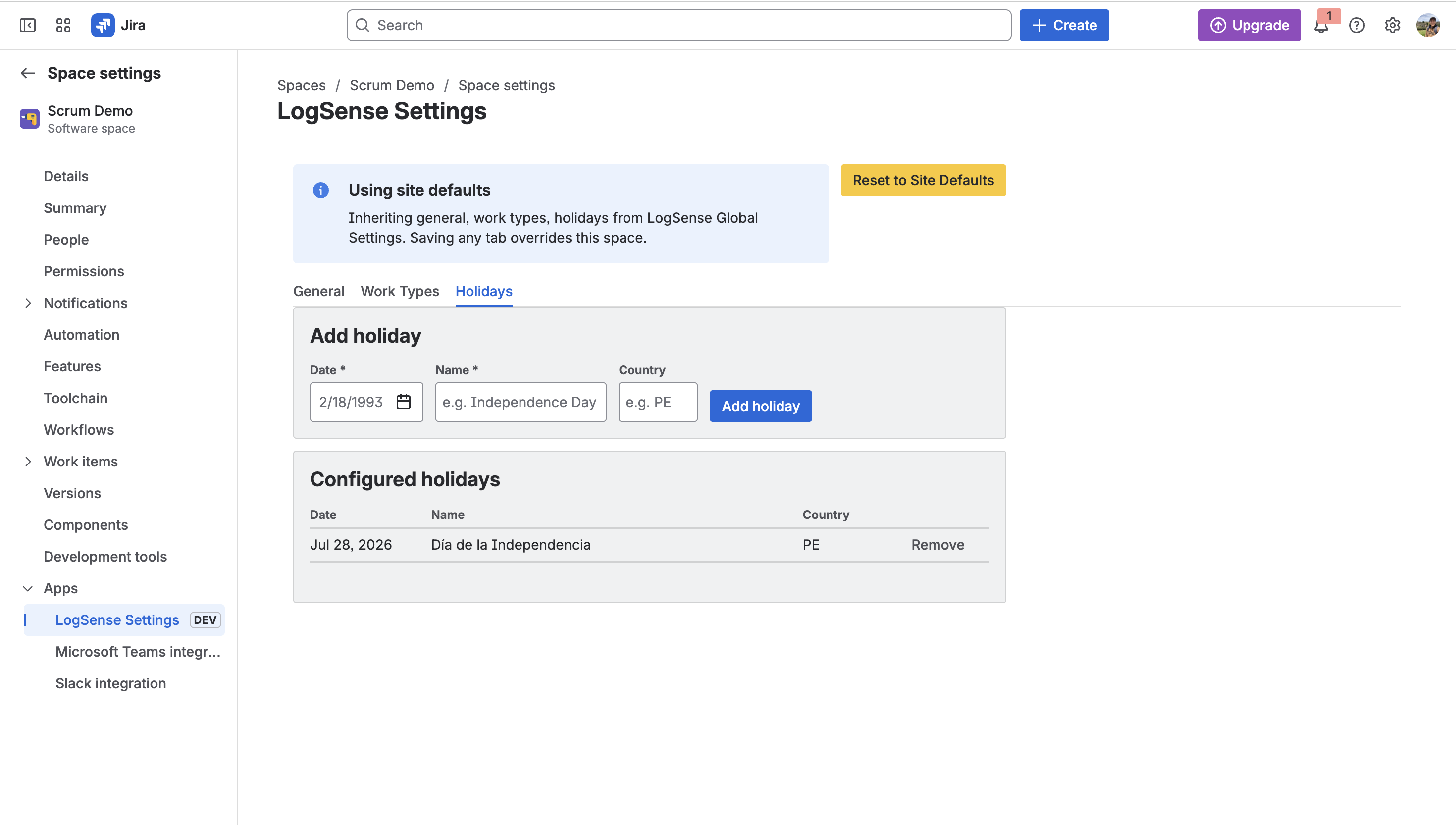
Adding holidays
- In Holidays, use the option to add a holiday date.
- Enter the date (and optional description if the UI allows).
- Save changes.
Holidays apply only to the space where they are configured. Version 2.0.0 has no inheritance from site-wide global settings (planned in later releases).
Behavior when logging time
| Condition | Result |
|---|---|
| Entry date is not a holiday | Logging allowed (subject to other validations). |
| Entry date is a holiday and blocking is active | Form rejects the entry. |
| Holiday blocking disabled | Holidays are stored but do not block entries. |
Use cases
- National holidays of the delivery team's country.
- Year-end closures or organization non-working days.
- Planned space freezes (e.g. change freeze periods).
Per-space calendars
Multi-country teams can define different holidays in separate spaces. Site-wide global configuration (v2.1.0+) will simplify inheritance to spaces.
Relationship with the General tab
The Holiday blocking toggle in General must be enabled for dates in this tab to prevent new entries.