Chat on the portal
The Live Chat for JSM widget allows you to communicate in real time with support agents from the JSM service portal.
The administrator decides which portals have it available. If the current portal is not enabled, the Live Chat button will not appear and you can use the portal's other help options.
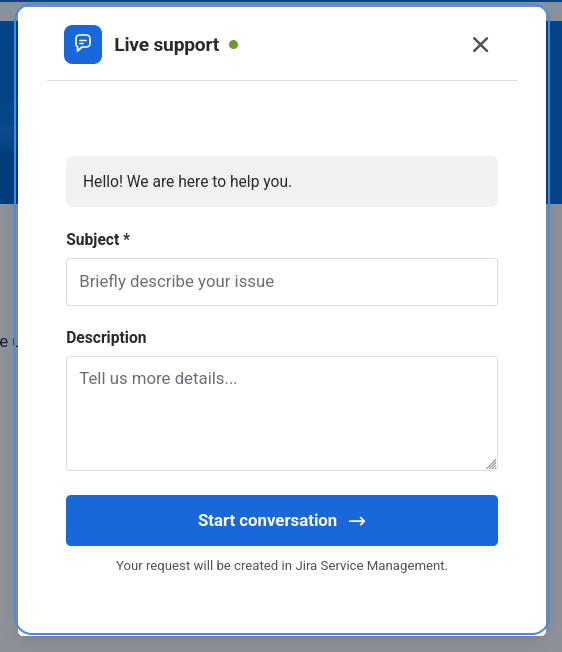
Start a chat
- Access the Jira Service Management service portal.
- In the bottom right corner, locate the Live Chat floating button.
- Click the button to open the widget.
- Type your query message in the text field.
- Click Send or press Enter to start the conversation.
The request will be created in the Service Desk associated with the current portal. The system will connect you with an agent when one is available.
You can only have one open conversation per portal. If there is already an active chat on the portal, the widget reopens that conversation instead of allowing you to create a new one. You must wait for it to close correctly (by agent or closing statuses) to start a different conversation.
Send messages
Once connected, you can send text messages in real time:
- Type your message in the text field at the bottom of the widget.
- Press Enter or click the send button.
- Messages will appear in the conversation.
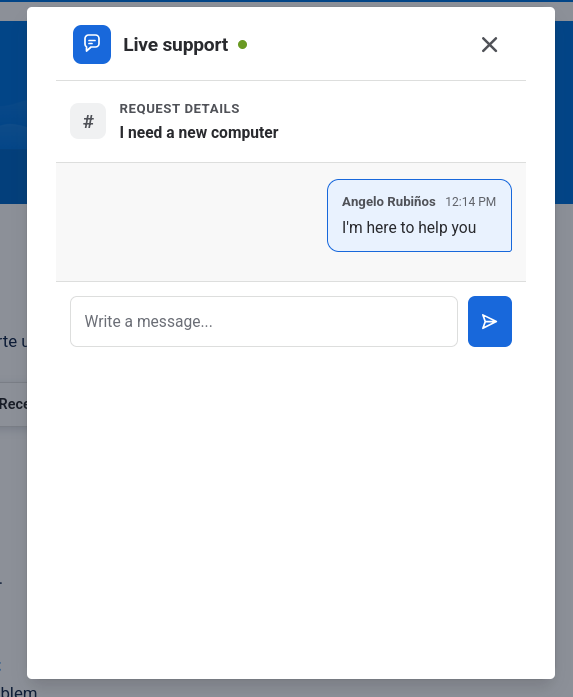
Active chat recovery
Your chat session remains active if you reload the page, accidentally close the widget, or temporarily lose connection. The conversation is recovered from the server when you reopen the chat. It only restarts if the request no longer exists or the chat was closed.
Mobile usage
On small screens, the widget automatically adapts and can occupy the full screen. This allows you to read the conversation and type more comfortably.
Chat closure
The chat ends when the agent resolves the associated request. You will see a message indicating that the conversation has been closed.
If you need additional assistance after closure, start a new chat from an enabled portal.