Send documents to the SFC
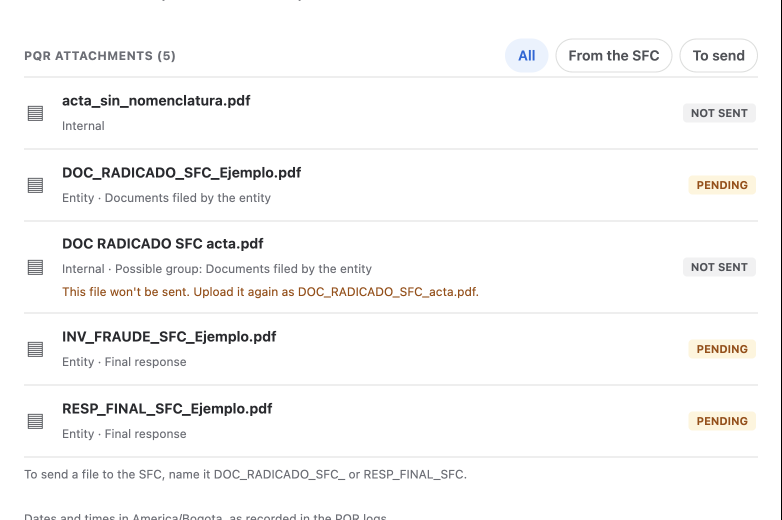
Files sent to the SFC must be attached directly to the PQR. Use the transition configured by your administrator and follow the required naming convention:
| Document type | How to identify the file | Action |
|---|---|---|
| Document filed by the entity | The name begins with DOC_RADICADO_SFC_ | Sent using the filed-documents transition. The prefix is not sent to the SFC. |
| Final response | The name contains RESP_FINAL_SFC | Sent using the final-response transition. At least one final-response file is required. |
| Optional fraud evidence | The name contains INV_FRAUDE_SFC | May accompany the final response; it is optional. |
Follow Jira and integration file type and size restrictions. The PQR attachment panel groups files into Documents filed by the entity and Final response, and shows whether each is pending, sent, rejected or not transmitted. If a filename does not follow the convention, the panel displays a warning and a suggested name; upload the file again with that name so it can be sent. If the required final-response file is missing, the validator blocks the transition and nothing is sent.
If the SFC already has a file with the same content, the app may accept it as a duplicate: it does not send it again and reports this in the result. After transmission, review per-file details in the panel or PQR history.
Create or update the PQR
Configured transitions create or update the PQR in the SFC. The app checks required fields and records the result. A PQR that originated in the SFC is not created again. If a transmission fails, review the history message and correct the data before retrying.