Workflows and validators
In Jira model, select transitions from the workflow associated with the PQR project and work item type. Only transitions from that workflow are offered. Diagnostics verify that required post-functions and validators are present and correctly placed; they do not install rules in existing workflows.
| Transition / purpose | Required configuration |
|---|---|
| Create a PQR in the SFC | Add Create PQR in the SFC (Smart Supervision) to the configured transition. It is skipped for a PQR already received from the SFC. |
| Update a PQR in the SFC | Add Update PQR in the SFC (Smart Supervision) to the configured transition. The app validates required fields before sending. |
| Send documents filed by the entity | Add Send filed documents to the SFC (Smart Supervision) to the configured transition. It sends native PQR attachments whose names begin with DOC_RADICADO_SFC_. |
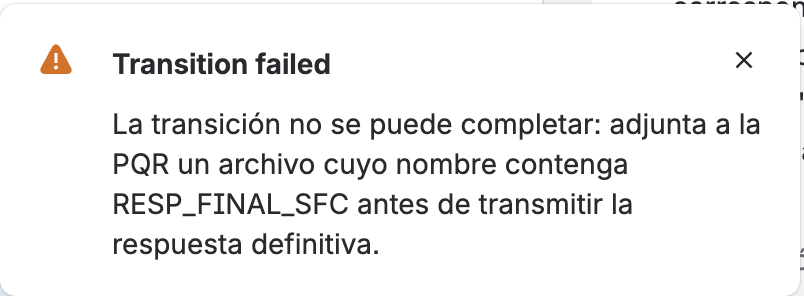
| Send the final response | Add Send final response to the SFC (Smart Supervision) and the Validate SFC response file (Smart Supervision) validator to the final-response transition. The PQR must have an attachment whose name contains RESP_FINAL_SFC. |
| Update requiring fraud data | Add the Fraud data complete (Smart Supervision) validator to the update transition. For applicable reasons, the analyst must complete typology, modality, claimed amount and recognized amount before proceeding. |
If the final-response file is missing, the Validate SFC response file (Smart Supervision) validator blocks the transition and Jira shows the reason.
Fraud data
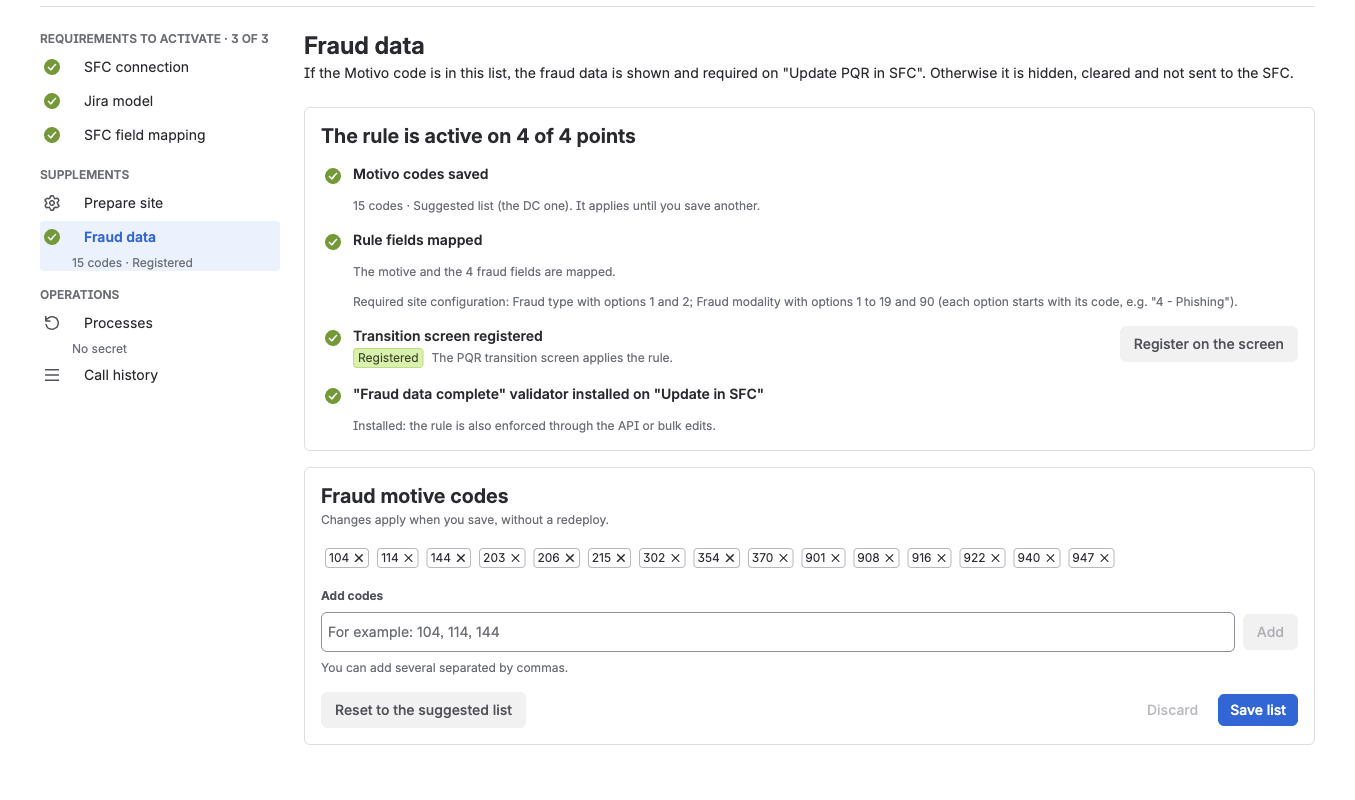
The fraud rule is configured in Fraud data. The checklist The rule is active on {active} of {total} points brings together the four requirements:
- Motivo codes saved: the codes that require fraud data. They are shown as tags.
- Rule fields mapped: Motivo and the four fraud fields (type, modality, claimed amount and recognized amount) must be mapped in SFC field mapping.
- Transition screen registered: the update transition screen applies the rule. If it shows Not registered, select Register on the screen.
- "Fraud data complete" validator installed on "Update in SFC": prevents the transition from completing through the UI, the API or a bulk edit when data is missing.
Under Fraud motive codes, enter one or more separated by commas in Add codes and select Add. The placeholder shows For example: 104, 114, 144 and the help text reminds you that You can add several separated by commas. Codes are shown as tags and can be removed one by one. Reset to the suggested list restores the DC list; Discard returns to the saved list and Save list applies the changes without a redeploy. The transition screen is registered separately with Register on the screen; the status must show Registered.
The rule applies when the PQR's Motivo is in the list. Otherwise, the fields are hidden, cleared and not sent to the SFC. The Fraud data complete (Smart Supervision) validator must be on the update transition; Jira model diagnostics report whether it is missing or installed on a different transition.
A post-function may log integration errors without rolling back a transition that has already completed. Check the PQR history for the result and resolve the issue.