Creating the Field
Once the add-on is installed, you can create "Dynamic Work Item Picker" custom fields just as you would with any other field type in Jira.
Initial setup flow
Steps by stage
Use the tabs to follow the flow. They share a groupId with other guides in the same product when applicable.
- Create the field
- Associate with screens
-
Navigate to Custom Fields:
- In your Jira instance, click the Settings icon (cogwheel) in the top right corner.
- Select Issues from the dropdown menu.
- In the left sidebar, under the FIELDS section, click Custom fields.
-
Create a New Field:
- Click the Create custom field button.
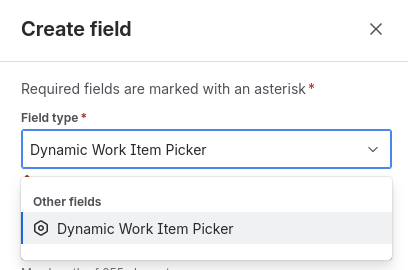
- A side menu will open. Search for and select the Dynamic Work Item Picker type.
- Enter a Name for your field (e.g., "Related Issues," "Depends on"). This is the name users will see.
- Provide a Description (optional) to clarify the field's purpose.
- Click Create.
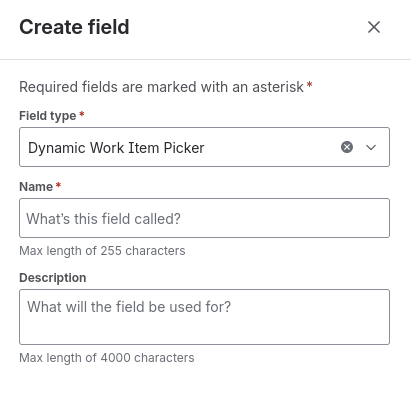
That's it! You have created your first Dynamic Work Item Picker field.
After creating the field, Jira will enable it for you to associate with one or more screens in your Spaces.
-
Find the field with the name you created.
-
In its settings, select the Add field to screen option.

-
Check the boxes for the screens where you want the field to appear (e.g.,
PROJECT: Create Issue Screen,PROJECT: Edit/View Issue Screen).
-
Click Update.
Now that the field exists, the next step is to configure its behavior and appearance.